Welcome to Join Bareng, the smart platform for enjoying Apple Music Family together! We help you access all premium Apple Music features at a much more affordable and legal price through slots provided by our Hosts.
What is Apple Music Family?
Apple Music Family is Apple's streaming music subscription plan that allows up to 6 people (the Host + 5 others) within an Apple Family Sharing group to enjoy Apple Music individually. Each member gets full access to millions of songs ad-free, offline listening, radio, and personalized playlists.
Why Share Apple Music Family on Join Bareng?
- ✅ Cost Savings: Get access to Apple Music at a much lower price compared to subscribing on your own.
- 💸 Safe & Trusted: Join Bareng manages the process of finding Hosts and handling payments, ensuring the security of your data and the convenience of your transactions.
- 🔒 Legal: We facilitate account sharing in compliance with Apple's Family Sharing terms, allowing for a legal and comfortable experience.
- 🤝 Full Support: Our team is ready to assist you with any questions or issues you might encounter during the joining process.
Roles & Responsibilities in a Sharing Group
Sharing an account is easy, as long as every member knows their role:
For You as a Joiner:
- Accept Invitation: You must provide your Apple ID (email) to the Host and accept their invitation to join their Apple Family Group. For more information on how Apple Family Sharing works, you can visit the Apple help center.
- Follow Rules: You must use the account according to the terms and conditions, do not change group settings or the Host's account details, and ensure your Apple ID region matches the Host's. For the Joiner terms and conditions on Join Bareng, you can visit our help article here.
How It Works: Simple!
Join Bareng connects you (as a Joiner) with Apple Music Family account owners (as Hosts) who have empty slots.
Steps for You as a Joiner:
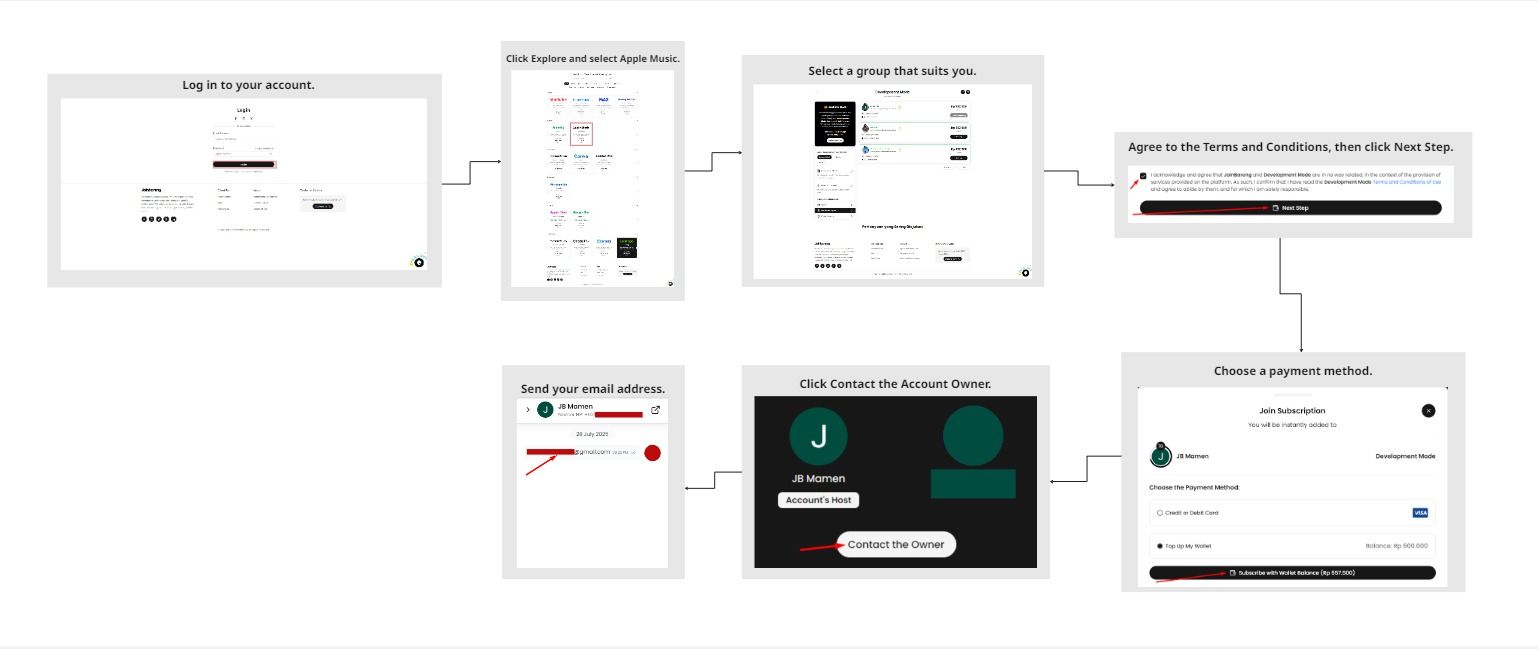
- Find & Pay: Log in to your Join Bareng account, then search for available "Apple Music Family" groups. Once you find a suitable one, complete the payment through our platform.
- Receive Invitation: You'll receive an invitation from the Host (via a notification on your Apple device or an email connected to your Apple ID). Be sure to accept the invitation promptly to join the Apple Family Group.
- Ensure Region Matches: Make sure your Apple ID country/region is the same as the Host's to be able to join. If it's different, you might need to change it first.
- Enjoy Premium! Once successfully joined, you'll immediately have access to all Apple Music Premium features on your personal account.
Important to Know: Apple ID Region Restrictions
Apple Family Sharing, including Apple Music Family, requires all members of the Family Group to have the same Apple ID country or region as the Host. If a Joiner's Apple ID region is different, they will not be able to join. This ensures a legal and smooth sharing experience.
Costs & Support
- You'll enjoy Apple Music at a significantly lower cost! Specific pricing details will be visible when you select a group on the Join Bareng platform.
- Support: We are here to help if you encounter any issues joining a group or have any questions.
Short FAQ
- Q: Will my data (songs, playlists, history) be mixed with the Host's or other Joiners' accounts?
A: No. Each Joiner uses their own personal Apple ID. Your data is private and will not be mixed with the Host's account. - Q: Can I change the Host's Family Group settings?
A: No. Joiners do not have access to change the Host's Apple Family Group settings. Only the Host has full control. - Q: What if the Host doesn't follow the rules?
A: Join Bareng has strict policies. If a Host violates the rules (e.g., account inactive without notice), we will take action and may take necessary steps to protect Joiners.
Ready to Listen to Ad-Free Apple Music for Less?
Don't miss out on millions of songs, exclusive radio, and personalized playlists without limits at the best price! Click the button below to find the perfect Apple Music Family group for you on Join Bareng and start listening now.